
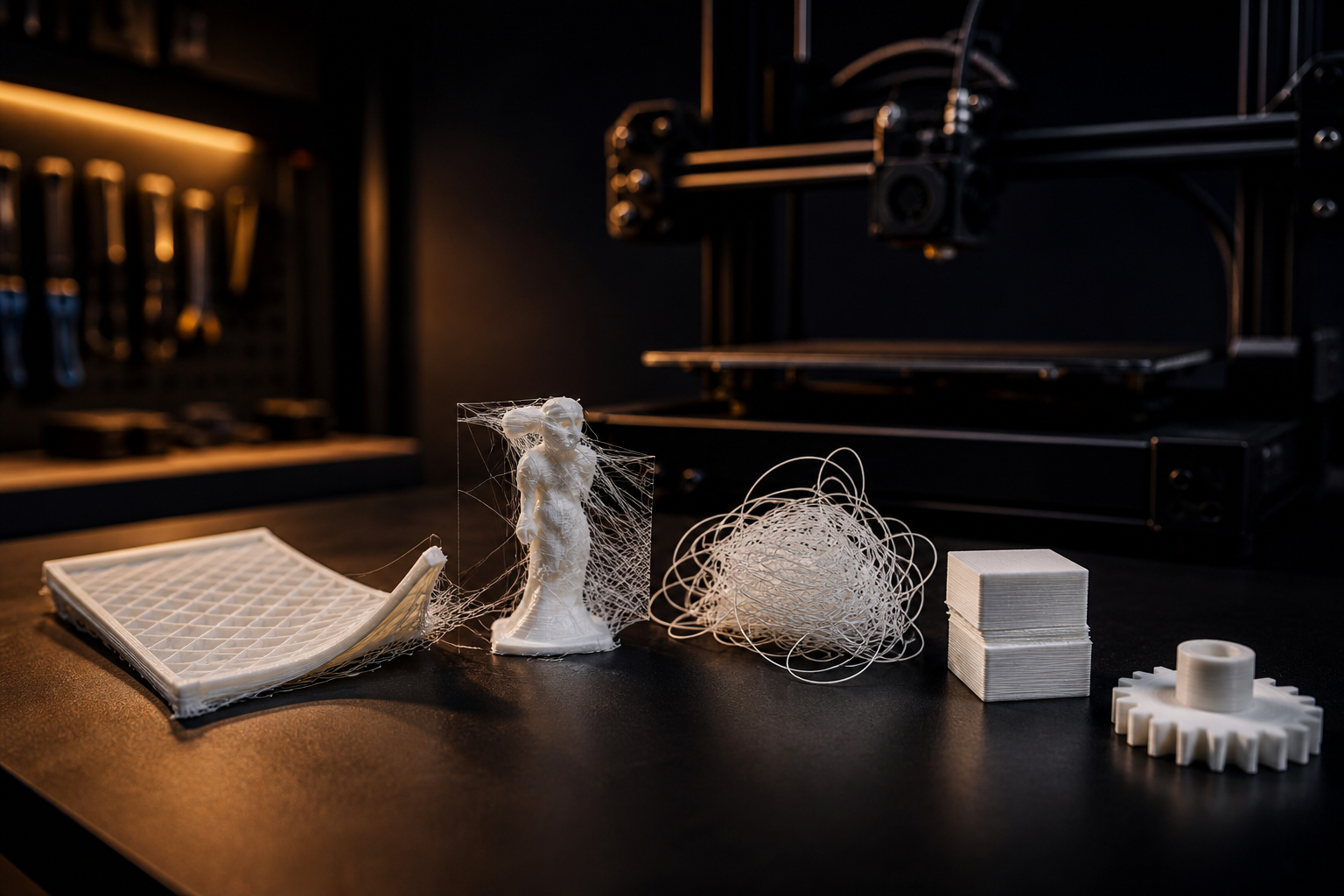
Most failed prints are not “bad printers.” They are a handful of repeatable problems: the first layer did not stick, the filament was wet, the nozzle was partially clogged, or a setting fought the material. After years of running FDM machines — from open-frame beginners to enclosed workhorses — the same defects show up in Cairo workshops and home desks alike.
This guide is a diagnostic, not a theory lesson. Look at the failed part, match the symptom, then change one variable at a time. If you change temperature, speed, and bed leveling together, you will never know what actually fixed it.
Start here: model, settings, or machine?
Before you tear the hotend apart, ask three questions:
- Did this file ever print successfully on this machine? If yes, the model is probably fine. Look at filament, nozzle, and first-layer setup.
- Is the failure in the first 3–5 layers? That is almost always bed leveling, Z-offset, dirty bed, or a cold first layer — not infill or supports.
- Did the print run for hours and then fail? Think wet filament, partial clog, loose belts, or a power flicker. Egypt’s summer humidity and unstable voltage make these more common than most tutorials admit.
1. The print will not stick to the bed
Poor bed adhesion is the number-one beginner failure. You hear the nozzle scrape, the first outline drags, or the skirt looks dashed instead of a continuous line.
What you will see
- The first layer peels up in corners, or the whole part slides with the nozzle.
- The skirt does not stick, or it looks too thin and broken.
- The underside of the part is rough, shiny in patches, or full of gaps.
How to fix it
- Level the bed and set Z-offset. On a clean bed, the first-layer line should be slightly squished: wide, even, and with no gaps between adjacent lines. If it is round like spaghetti, the nozzle is too high. If it is transparent and scraped, it is too low.
- Wash the bed. Finger oil kills adhesion. Wash PEI or glass with warm water and dish soap, then isopropyl alcohol. Do not touch the print surface after cleaning.
- Raise first-layer temperature. For PLA, try bed 60–65°C and nozzle 5–10°C hotter on layer one only. For PETG, a clean PEI sheet and a slightly higher Z-offset often work better than glue.
- Slow the first layer down to 20–30 mm/s. Speed is the enemy of adhesion.
- Use a brim on small footprints (phone stands, figurine bases, thin legs). A raft is rarely needed on a healthy bed.
In Egyptian summers, a very hot room can make PLA first layers overly soft and “smeary.” If the room is above ~30°C, drop the bed 5°C and keep a light draft off the printer — a fan blowing on the bed will cool the first layer too fast and pop it off.
2. Warping: corners lifting
Warping is plastic shrinking as it cools. The part pulls itself off the bed, usually at the corners. ABS and ASA do this aggressively. PLA can warp on large, flat parts if the bed is cool or the room has a draft from an AC unit.
- Add a brim (5–8 mm) to pin the corners down.
- Kill drafts. An open window or split AC aimed at the printer is a classic warp source. A simple cardboard enclosure helps more than another glue stick.
- Increase bed temperature within the material’s range (PLA 60°C, PETG 70–80°C, ABS 90–110°C with an enclosure).
- Avoid huge solid first layers on ABS without an enclosure. If you need ABS strength, print inside a box or hire a maker who already has one.
3. Stringing: hairs between towers
Thin whiskers between separate parts of the model mean the nozzle is drooling while it travels. PETG strings more than PLA. TPU strings if you treat it like PLA.
- Dry the filament. Wet filament steams in the nozzle and spatters. In coastal or humid cities (Alexandria, summer Cairo), PLA left on the shelf for two weeks is often wet enough to string. Dry PLA at ~45–50°C for 4–6 hours; PETG at ~65°C.
- Enable retraction (Bowden: 4–6 mm; direct drive: 0.6–1.5 mm) and start with 35–45 mm/s retract speed.
- Drop nozzle temperature 5°C if walls look glossy and over-melted.
- Increase travel speed so the nozzle spends less time leaking.
Do not chase stringing with extreme retraction on PETG — you will grind the filament and create a clog. Dry first, then temperature, then retraction.
4. Under-extrusion, gaps, and weak walls
You will see holes in top surfaces, thin walls, missing infill, or a clicking extruder. The printer is commanded to push plastic that is not coming out.
- Check the nozzle. A 0.4 mm nozzle after abrasive filament (wood, glow, carbon) is often 0.5 mm and irregular. Replace cheap nozzles; they are consumables.
- Heat a few degrees more if the extruder motor skips. Cold plastic cannot melt fast enough at high flow.
- Calibrate e-steps / flow with a single-wall cube. Guessing flow at 80% or 120% hides a mechanical problem.
- Inspect the PTFE path and extruder gear. Dusty, chewed filament and a loose idler spring are common after months of use.
A partial clog often starts as “random” tiny gaps, then becomes a full jam. If quality slowly got worse over several prints, assume a clog before you rewrite your whole profile.
5. Over-extrusion: blobs, elephants, and dimensional errors
Too much plastic looks like ridges, blobs at layer changes, and holes that print smaller than designed. “Elephant’s foot” — a flared first few layers — is a cousin: the bed is hot and the nozzle is slightly too low, squishing extra plastic outward.
- Lower flow by 2–5% after you confirm e-steps are correct.
- Raise Z-offset a hair if layer one is transparent and the part welds to the bed too hard.
- Enable a small initial layer horizontal expansion (negative, e.g. −0.2 mm) if the first layer is oversized but the rest of the part is fine.
6. Layer shifts
A sudden step in X or Y, as if the model was cut and slid, is almost never the slicer. It is mechanical or electrical:
- Loose belts (the most common cause). They should twang like a low bass string — tight, not guitar-tight.
- Print speed / acceleration too high for the frame. Drop speed 20% and test.
- A cable snagging the gantry, or a spool that jerks the extruder.
- A brownout or restart. If shifts happen at night in your building, a UPS on the printer is cheaper than reprinting a 14-hour job.
7. Layer splitting and poor strength
The part looks complete, then snaps along a layer line. That is weak interlayer bonding:
- Nozzle too cold, or cooling fan too aggressive on PETG/ABS.
- Layer height too high for the nozzle (stay at or below 75% of nozzle diameter: 0.28 mm max on a 0.4 mm nozzle for quality prints).
- Wet filament. Moisture turns into steam and leaves tiny voids between layers.
For functional parts, wall count beats infill. Three or four perimeters at 20–30% gyroid infill are stronger in real use than 2 walls at 80% infill — and they print faster.
A 10-minute health check before the next print
- Clean the bed. Level or confirm mesh + Z-offset with a first-layer test square.
- Feel the filament: brittle PLA that snaps in your fingers is degraded or soaked. Dry or replace it.
- Preheat and purge until the bead is consistent, not speckled or sputtering.
- Confirm belts and bed screws are snug after moving the printer.
- Print a 20 mm calibration cube or a small torture object before a long job.

Comments (0)
No comments yet. Be the first to share your thoughts.