
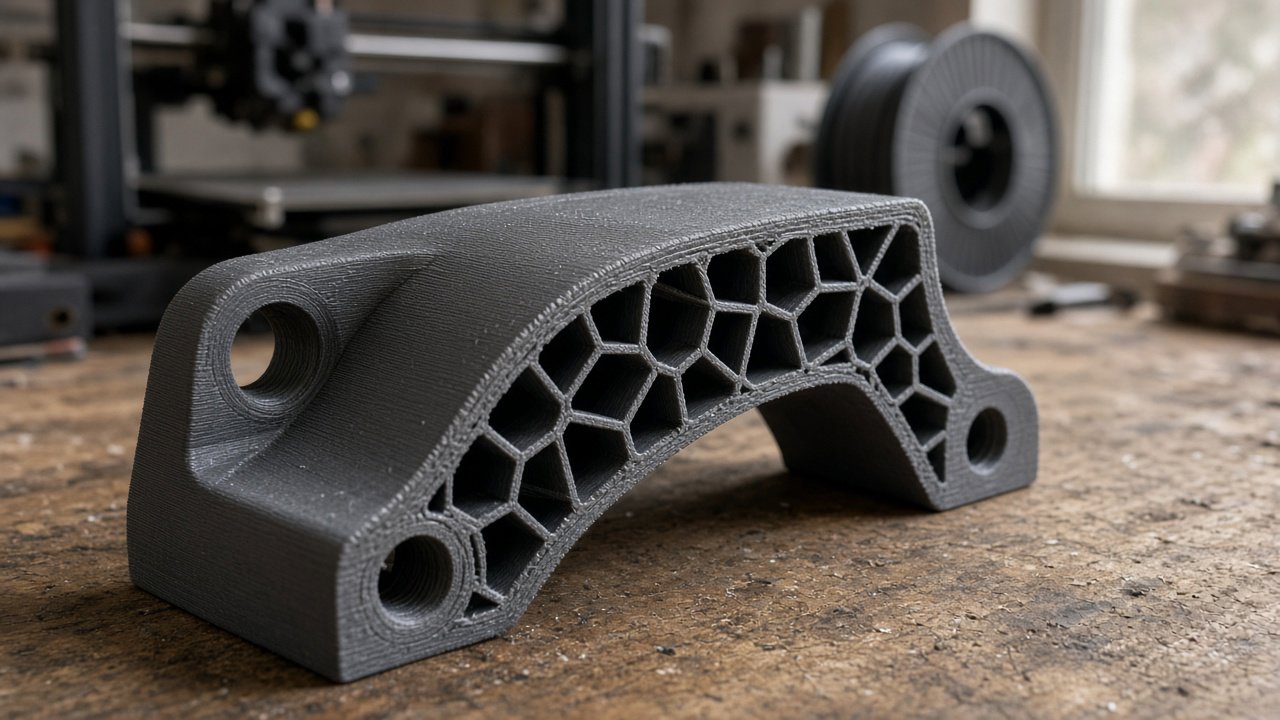
A client once sent me a phone mount that snapped at the hinge after two weeks on a dashboard. The slicer file showed 100% infill, 0.28 mm layers, two walls. He was convinced the filament was weak. The filament was fine. The walls were thin, the layers sat in the worst direction for the load, and the car interior hit temperatures PLA simply does not like.
If you have been printing for six to twelve months, you have probably absorbed a few strength “rules” from forums and YouTube. Some of them waste filament. Some of them break parts. Here is what I actually see on the bench.
Myth: 100% infill makes the strongest part
Reality: for most FDM parts, strength comes from the outer shells first. Bumping from 20% to 40% infill helps. Jumping from 40% to 100% often adds hours and grams for a small gain, while two extra walls can do more for bending and impact.
Typical functional settings I use for brackets, clips, and tool holders:
- Walls / perimeters: 3–4 at 0.4 mm nozzle (about 1.2–1.6 mm of solid shell)
- Top/bottom layers: 4–6 solid
- Infill: 25–40% for most loads; gyroid or cubic; 50–60% only when the part is short and heavily compressed
- Layer height: 0.16–0.20 mm for strength-critical pieces; 0.28 mm is fine for bulky non-critical mounts
100% infill still has a place: tiny bushings, short compression pads, or when you need mass. It is not a default “make it strong” switch. On a mid-size bracket, 100% can push print time from roughly 3 hours toward 6–8, and filament cost in Egypt from something like approximately 25–40 EGP of material toward double that, without fixing a bad orientation.
Myth: if the settings are good, orientation does not matter
Reality: FDM is anisotropic. Layers bond weaker across Z than along the bead. A hook printed so the load peels layers apart will fail early even at 50% infill and four walls.
Quick rule I tell people:
- Put the main tensile or bending load in the XY plane when you can
- Avoid hinges, screw bosses, and snap fits that open along layer lines
- If a hole takes a bolt that pulls sideways, print so the bolt axis is not trying to split layers like a book
Example: a door latch claw kept cracking after a few slam cycles. Same PETG, same 35% infill, same four walls. Rotating the part 90° so the claw curve ran with the layers fixed it. No settings change. Just orientation.
It depends on the load path. If you cannot visualize how force travels through the part, sketch arrows on the STL before you slice. That five minutes beats reprinting.
Myth: thicker layers always mean a tougher part
Reality: thicker layers print faster and can feel stiffer in compression, but they leave fewer interfaces and often worse detail on stress risers (sharp corners, thin ribs). For functional parts under bending or impact, I prefer 0.16–0.20 mm with solid walls over 0.32 mm “tank mode.”
Where thicker layers help: large spacers, jigs that only see light push loads, prototypes you will iterate the same day. Where they hurt: living hinges, thin clips, anything with a small cross-section that must flex without cracking.
Myth: PLA is fine for outdoor or car use in Egypt
Reality: PLA softens in the 55–65°C range depending on brand and color. A closed car in Cairo or Alexandria sun regularly exceeds that. Balcony parts in direct UV also chalk and go brittle over months, even if they never “melt” into a puddle.
What I would do:
- Indoor dry climate fixtures: PLA or PLA+ is fine; 3–4 walls, 30% infill is usually enough
- Workshop tools near motors / enclosures: PETG first; watch creep under constant load
- Outdoor sun, motorcycle, dashboard: PETG or ASA/ABS if you can print them reliably; do not trust standard PLA
- Food contact / medical: do not improvise; FDM porosity and unknown additives are a real safety limit
Annealing PLA can raise heat resistance a bit, but dimensions move. Measure after, not before. For a client part that must sit in a hot car, I quote PETG or better and say so up front rather than promising a cheap PLA print that warps in a week.
Approximate material cost for a small 40–80 g functional part printed locally often lands roughly in the 30–120 EGP filament range before labor, depending on material and waste. Heat-ready materials cost more and are worth it when the failure mode is “softened in the sun.”
Myth: more material always beats smarter geometry
Reality: a thin wall with a rib in the right place beats a chunky solid blob. Fillets at corners reduce crack starts. Screw bosses want enough solid perimeter (often three walls plus local denser infill), not global 100% fill.
Also: wet filament kills interlayer strength faster than a “wrong” infill percentage. If PETG strings like crazy and layers look matte and weak after humid weeks, dry it before you blame the slicer. Egypt humidity is not optional; dryness is part of strength.
Strong functional prints are mostly walls in the right orientation, a material that survives the temperature, and enough infill to keep the shells from collapsing—not a maxed-out density slider.
What to do on your next functional print
Before you hit slice, check three things only: load direction vs layer lines, wall count (start at 3–4), and whether the part will see sun or dashboard heat. Set infill after that, usually 25–40%.
If the part is for a client or you want a second opinion on material and orientation, post the request on Souq3D and compare maker offers, or run a rough time/material sanity check on the 3D cost calculator before you commit filament.
Print one intentional test coupon in the same orientation as the real part if the load is critical. Breaking a 30-minute strip teaches more than three full reprints of the finished design.
Comments (0)
No comments yet. Be the first to share your thoughts.